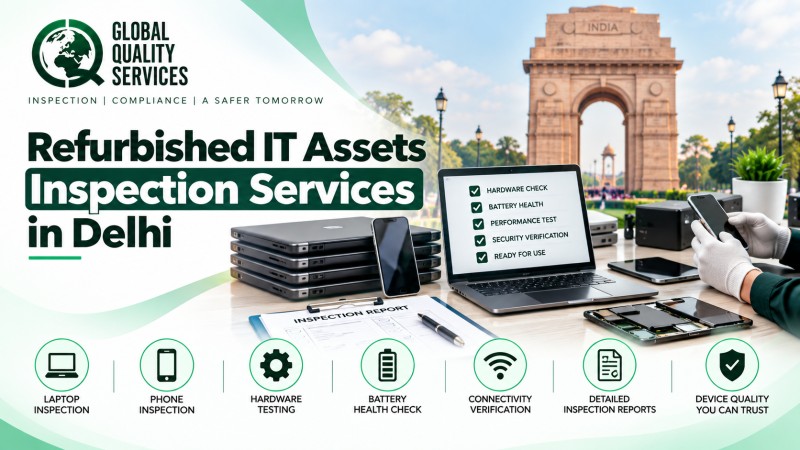
Delhi has a large and active market for business technology, making laptops, smartphones, desktops, and other IT equipment a regular part of daily operations. At the same time, more buyers are turning toward refurbished devices to control technology costs. India’s refurbished smartphone volumes grew 13% year-on-year in H1 2026, according to data cited by Hindustan Times.
Refurbished equipment can work reliably, but only when technicians properly inspect and test it. A device may look good externally while hiding battery problems, damaged components, poor performance, or security concerns.
That is where refurbished IT asset inspection services in Delhi become useful. A professional inspection gives businesses, resellers, ITAD companies, and buyers a clearer picture of an asset before they purchase, sell, reuse, or deploy it.
Understanding Refurbished IT Asset Inspection
Refurbished IT asset inspection is a detailed check of previously used electronic equipment before its next use or resale.
Instead of simply switching on a device and checking its appearance, inspectors examine its physical condition, components, functionality, software, and security status.
Depending on the asset, the inspection may cover:
- Device model and serial number
- Physical condition and visible damage
- Display and touchscreen
- Battery health
- Charging performance
- Keyboard and touchpad
- USB and other ports
- Cameras, speakers, and microphones
- RAM and storage
- Processor performance
- Wi-Fi and Bluetooth
- Operating system
- Device activation status
- Security and account locks
- Replaced or repaired components
For smartphones, inspectors can also verify IMEI details, SIM functionality, biometric features, network connectivity, cameras, and charging ports. Laptop inspections can include SSD or HDD condition, RAM, thermal performance, webcam, keyboard, battery cycles, and operating-system status.
Why Do Businesses in Delhi Need Refurbished Device Inspection?
Delhi businesses handle IT assets in many ways. Companies purchase equipment for employees, retailers resell devices, leasing firms recover them, and ITAD providers prepare assets for their next stage.
Without proper testing, a device can reach a customer or employee with problems that were not visible during a basic visual check.
A structured inspection can help businesses:
- Find hidden hardware problems
- Verify the actual condition of an asset
- Check whether repairs meet requirements
- Confirm device specifications
- Identify missing or replaced components
- Assess battery and storage health
- Detect activation or security locks
- Support consistent asset grading
- Reduce returns and warranty-related issues
- Improve customer confidence
- Keep usable devices in circulation longer
Inspection also supports more responsible IT asset reuse. Delhi continues to deal with a significant e-waste challenge, making proper evaluation of reusable electronics particularly relevant before businesses decide whether to refurbish, resell, reuse, or recycle them.
What Goes Into a Refurbished Laptop Inspection?
A laptop needs more than a simple power-on check. Inspectors should test the components that affect everyday performance and usability.
1. Exterior and Physical Condition
The inspection starts with the laptop body. Inspectors check the chassis, screen, hinges, keyboard, touchpad, screws, casing, ports, and other external parts.
They record cracks, dents, scratches, loose components, corrosion, missing parts, and visible signs of previous repair.
2. Internal Hardware and Performance
Next, the inspection focuses on the hardware that drives the laptop. The team can check the processor, RAM, storage drive, graphics performance, cooling system, and other important components.
These checks help identify slow performance, storage problems, overheating, or hardware degradation.
3. Battery and Charging Condition
Battery performance matters greatly when assessing a refurbished laptop. Inspectors check battery health, charging behaviour, power retention, unusual discharge, and related issues.
They can also examine the charger and charging port for visible or functional problems.
4. Ports and Everyday Functions
A laptop may work normally but still have a faulty USB port, webcam, microphone, speaker, or wireless connection.
Inspectors can test USB, HDMI, audio, webcam, microphone, Wi-Fi, Bluetooth, keyboard, touchpad, and other available functions.
5. Software and Device Status
The inspection can also cover the operating system, activation status, configuration, device locks, and other relevant software conditions.
This helps businesses identify devices that may need additional configuration before deployment.
How are Refurbished Smartphones Checked?
Smartphones require a slightly different inspection approach because several critical components sit inside a compact device.
A professional phone inspection can include:
- IMEI verification
- Screen and touchscreen testing
- Battery health
- Charging port condition
- Front and rear cameras
- Speaker and microphone
- Wi-Fi and Bluetooth
- SIM and mobile network
- Fingerprint or Face ID
- Buttons and vibration
- GPS
- Storage capacity
- Operating-system condition
- Activation and account locks
- Signs of water or physical damage
Inspectors can also look for evidence of replaced displays, batteries, charging components, or other major parts. Functional testing helps determine whether those replacements affect the phone’s usability.
For businesses handling large quantities, recording these results against individual asset IDs makes the inspection much easier to track.
Asset Grading After Inspection
Inspection findings can help businesses assign a practical condition grade to refurbished devices.
A typical grading model may look like this:
| Grade | General Condition |
| Grade A | Excellent physical and functional condition with very little visible wear. |
| Grade B | Good working condition with moderate cosmetic marks that do not affect normal use. |
| Grade C | Noticeable wear or cosmetic damage while the device remains functional. |
| Rejected | Serious defects, security issues, severe damage, or repair requirements make the device unsuitable for the intended use. |
Businesses should define their own grading rules based on their refurbishment policy, customer expectations, device type, and contractual requirements.
Which Businesses in Delhi Can Use IT Asset Inspection?
Refurbished IT asset inspection can support organisations at different stages of the device lifecycle.
Refurbished Device Sellers
Sellers can inspect devices before listing them and assign grades based on actual condition rather than appearance alone.
IT Asset Management Companies
Asset managers can maintain consistent inspection records while handling equipment across different departments or locations.
Electronics Resellers
Resellers can use inspection findings to verify device quality and reduce disputes with customers.
E-commerce Businesses
Online sellers can use documented inspection results to support product descriptions and improve transparency.
Corporate IT Teams
Companies can inspect refurbished laptops and phones before distributing them to employees or adding them to their IT inventory.
Leasing and Buyback Companies
Inspection helps leasing and trade-in businesses assess returned devices and decide whether to refurbish, resell, or route them for further processing.
ITAD Providers
IT asset disposition companies can use inspection results when deciding whether recovered equipment should move toward reuse, resale, repair, or recycling.
Educational Institutions
Schools, colleges, and training centres can inspect refurbished devices before distributing them to students and staff.
Government and Enterprise Buyers
Large buyers can use standardised inspection criteria when purchasing refurbished equipment in bulk.
A Practical 7-Step Process of Refurbished IT Asset Inspection
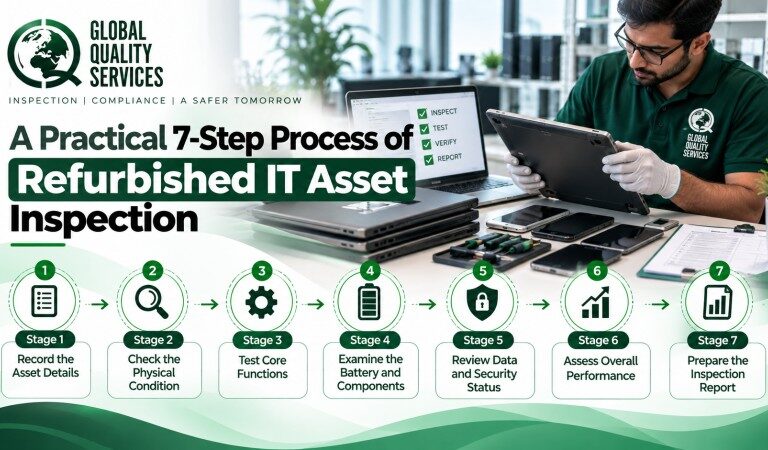
A clear process becomes especially important when an organisation needs to inspect hundreds or thousands of devices.
Stage 1: Record the Asset Details
Inspectors begin by recording the model, serial number, IMEI where applicable, configuration, asset ID, and other relevant information.
This creates a clear identity for every device.
Stage 2: Check the Physical Condition
The inspector examines the device carefully for cracks, dents, scratches, corrosion, missing components, loose parts, and signs of previous repairs.
Stage 3: Test Core Functions
The team then tests the major hardware and software functions using suitable diagnostic methods.
They can check displays, keyboards, touchscreens, cameras, speakers, ports, connectivity, and other device-specific functions.
Stage 4: Examine the Battery and Components
Inspectors assess battery condition and look for degraded, damaged, replaced, or defective components.
Stage 5: Review Data and Security Status
The inspection checks relevant device locks, account status, operating-system condition, activation status, and other security-related parameters.
Stage 6: Assess Overall Performance
The team looks for slow operation, overheating, storage problems, unstable performance, and other issues that could affect normal use.
Stage 7: Prepare the Inspection Report
Finally, inspectors compile the findings into a report. Depending on the agreed scope, it can include test results, defects, photographs, observations, asset details, and the recommended condition grade.
What are the Benefits of Independent IT Asset Inspection
When businesses rely only on seller information or visual checks, they may miss problems that appear later. An independent inspection gives them documented information before making a decision.
Better Refurbishment Quality
Inspection findings show which devices need additional repair, component replacement, cleaning, or testing.
Fewer Returns and Complaints
Testing devices before resale or deployment can reduce the chances of defective equipment reaching end users.
Consistent Device Grading
A defined checklist gives businesses a consistent way to classify devices across different batches.
Greater Buyer Confidence
Detailed inspection records make it easier to explain the actual condition and functionality of refurbished equipment.
Better Asset Traceability
Recording serial numbers, test results, defects, and condition grades creates a useful history for each device.
Smarter Purchasing and Resale Decisions
Businesses can use inspection findings when deciding whether to purchase, accept, repair, resell, deploy, or reject an asset.
More Responsible Reuse
Identifying functional equipment before sending it for disposal helps organisations keep suitable IT assets in use longer.
Partner with Global Quality Services for Refurbished IT Asset Inspection in Delhi
Make every refurbished IT asset count with a professional inspection. Global Quality Services helps businesses in Delhi assess laptops, phones, and other IT equipment for quality, functionality, and usability. Our experts identify potential issues before assets reach users or customers.
Partner with us to build greater confidence in your refurbished IT assets and make informed purchasing, resale, and deployment decisions. Contact Global Quality Services today to schedule your inspection.
Frequently Asked Questions
1. What does refurbished IT asset inspection involve?
Refurbished IT asset inspection checks used laptops, smartphones, and other devices for physical condition, functionality, battery health, components, security status, performance, and overall refurbishment quality.
2. Which IT devices can be inspected in Delhi?
Inspection can cover laptops, smartphones, tablets, desktops, monitors, servers, networking equipment, and other electronic assets, depending on technical specifications and agreed inspection requirements.
3. Why should businesses inspect refurbished laptops before deployment?
Inspection helps businesses identify hidden defects, verify specifications, check battery and hardware condition, reduce returns, and confirm whether refurbished laptops meet their required quality standards.
4. Can inspectors identify replaced smartphone components?
Inspectors can identify signs of replaced displays, batteries, charging components, and other parts through physical examination, diagnostic checks, device information, and functional testing.
5. How does inspection help with refurbished device resale?
Inspection creates documented evidence about device condition and functionality. Businesses can use these findings to grade assets, determine resale values, reduce disputes, and build customer confidence.